AIBoxBot最新教程:Midjourney V8.1 草稿模式:用 24 张草图快速筛选灵感 | Midjourney(附提示词)
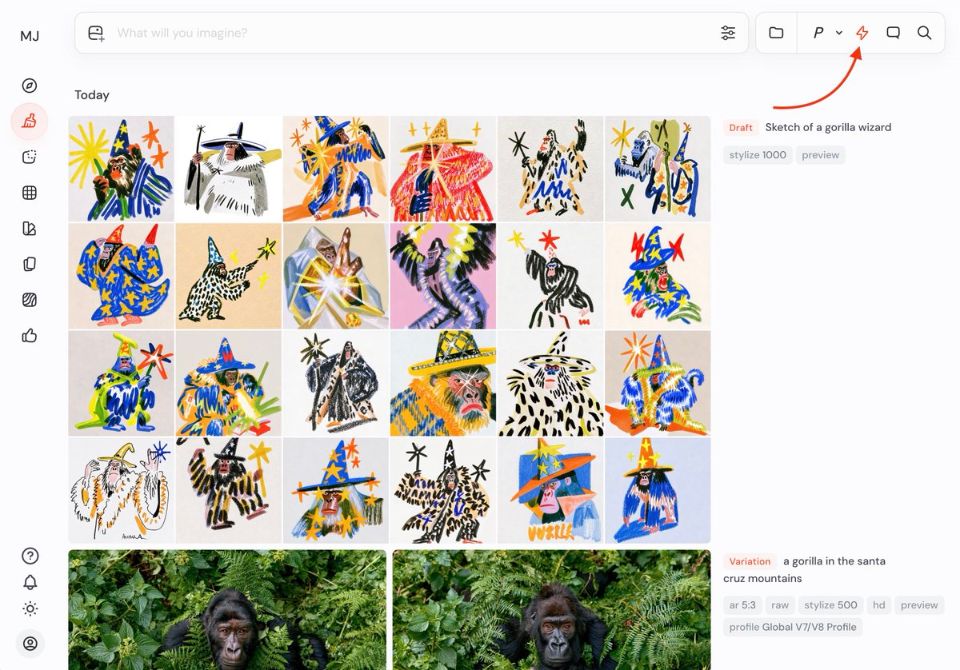
这张图展示的是 V8.1 新增的 Draft Mode 效果:一次性生成 24 张低清草图,用来快速试错和筛选构图。作者先用低分辨率、低质量粗略探索,再对喜欢的图点击「Vary」进行高质量重渲,从而兼顾效率与画面精度。适合角色设计、场景概念图等需要大量尝试的创作流程。
中文提示词(点击可复制)
English Prompt(点击可复制)
中文提示词(点击可复制)
一组多张概念图网格预览,每张都是奇幻角色与场景的草图,低分辨率、略微粗糙的笔触与纹理,用于快速构思与筛选灵感,风格多样:有未来科幻、有中世纪奇幻、有城市街景、有人物肖像,整体以中性灰与柔和色彩为主,仿佛设计师的初稿墙,高度视觉可读性,清晰的构图对比和光影关系,适合作为后续精修的基础,cinematic lighting, concept art, draft mode, --v 8.1 --style raw --ar 16:9 --q 0.5 --draftEnglish Prompt(点击可复制)
a large grid of multiple concept image thumbnails, each one a rough draft sketch of fantasy characters and environments, low resolution and slightly coarse texture and brushwork, used for fast ideation and visual exploration, mixed styles: futuristic sci-fi, medieval fantasy, urban street scenes, character portraits, mostly neutral grays and soft muted colors, like a wall of a concept artist’s early drafts, strong readability of shapes, clear composition and lighting contrast, serving as a base for later high-quality renders, cinematic lighting, concept art, draft mode, --v 8.1 --style raw --ar 16:9 --q 0.5 --draft